February 24, 2014

March Calendar Quick Page

0 Comments
Looks like the 14in14Project is turning into the Calendar QP project. hahaha,,
I have collected some pictures for the project, however never seem to get the time and inspiration to bundle it into a digiscrap page. What can I say, I just love taking pictures, especially taking pictures of my baby. 
Well,, March is coming in, and March is now a new month of joy for me, as my baby is turning 1 next month. I have prepared some ammo to celebrate her birthday. Maybe I'll share some DIY private party deco / recipe for your reference.
Nonetheless, here's the March QP, in relation to celebrating my baby's birthday and those of you who happens to born in the month of March.
Happy Birthday! Happy Life! Here's a not so toothless smile for ya!

http://www.4shared.com/photo/ZvV_ZLZzce/March_Calendar_QP.html

P. S. To replace the picture use red box as guideline.

January 31, 2014

CNY, Jacket Potato with Steak, It's Holiday!

1 Comments
Happy New Year!
I always love Chinese New Year, not only because it's a day off from work, but I always feel that CNY is a new year celebration with edge. If you always have red, green and white for X'Mas, then CNY is always filled with bright red, gold, dragons and magpies.
This year, just a day before CNY, I join a contest at digiscrap designer Hat of Bunny FB, and luckily I won this beautiful kit that is just perfect to celebrate CNY. 
So went straight ahead to my laptop, and try it on. Tada!! my li'l baby waving her first ang pao!
And to make it complete, I decided to make a show in the kitchen today. I bought this simple easy recipe book from Periplus a week before. It's called "The Hungry Student Cookbook", by the title you could say it contains a variety of easy breezy cheap western recipes, made with the most common ingredients with most common kitchen tools. What caught my eye is the Jacket Potatoes recipes. I LOVE Jacket Potatoes!! I remember going to Wendy's just to eat their cheese & broccoli baked potato. Now with the book, I can try to made my own. Here's a copy of the recipe if you'd like to try it out:

Jacket Potato
Ingredients
1 big baking potato
How to
Since I don't have an oven, I use the microwave to bake the potato. First wash your potato well and dry thoroughly. Prick the potato with a sharp knife 5 to 6 times all over to prevent the potato explode inside the microwave. Place the potato in a microwaveable plate. Cook on high for about 4 minutes. Turn the potato over and cook it again on high for another 2 minutes. Stick a sharp knife to the potato to check if it's done cooking. When it's cooked enough the knife would easily slip through the potato. If it's not done, cook again on high for another 2 minutes. Serve immediately with the topping

For the topping
Ingredients
100g raw tenderloin (or any other steak meat you like)
Olive oil
1/2 Onion peeled and sliced
Salt & Pepper
Broccoli simmered for few seconds

How to
Cut the tenderloin into thin strips then season with salt & pepper. Drizzle the pan with olive oil and cook the onion with medium heat until it's translucent. Put in the tenderloin into the pan, and cook until the steak is as you like it. For me it took only about 3 - 4 minutes to have it cook through but not overcooked so you can still find it juicy.

Set up your plate
Cut open the jacket potato, topped it with the steak & onion. Arrange the broccoli around the potato.

Voila! Here's your jacket potato with steak!


January 27, 2014

February Calendar Quick Page

0 Comments
As January is coming to an end and special month February is just waiting around the corner. It's time to share the February calendar quick page for your desktop.
February is always the month of love. Even though people are always shouting out on the street that everyday should be the day to share love, February will always be a sweet month for chocolate manufacturer. The sales of chocolate is always at their peak. Therefore in the mood of celebrating the month of love, February calendar will be extra pink by using a mini kit from Digiteedesigns : cherished. Below is a preview of what you can get. By the way, in order to fit my wide screen 13in laptop, I changed the format to 1366x768 pixels. Hope this format will fit perfectly to your screen as well. Enjoy!
http://www.4shared.com/photo/0PNn1PoCce/Feb_Cal_QP.html


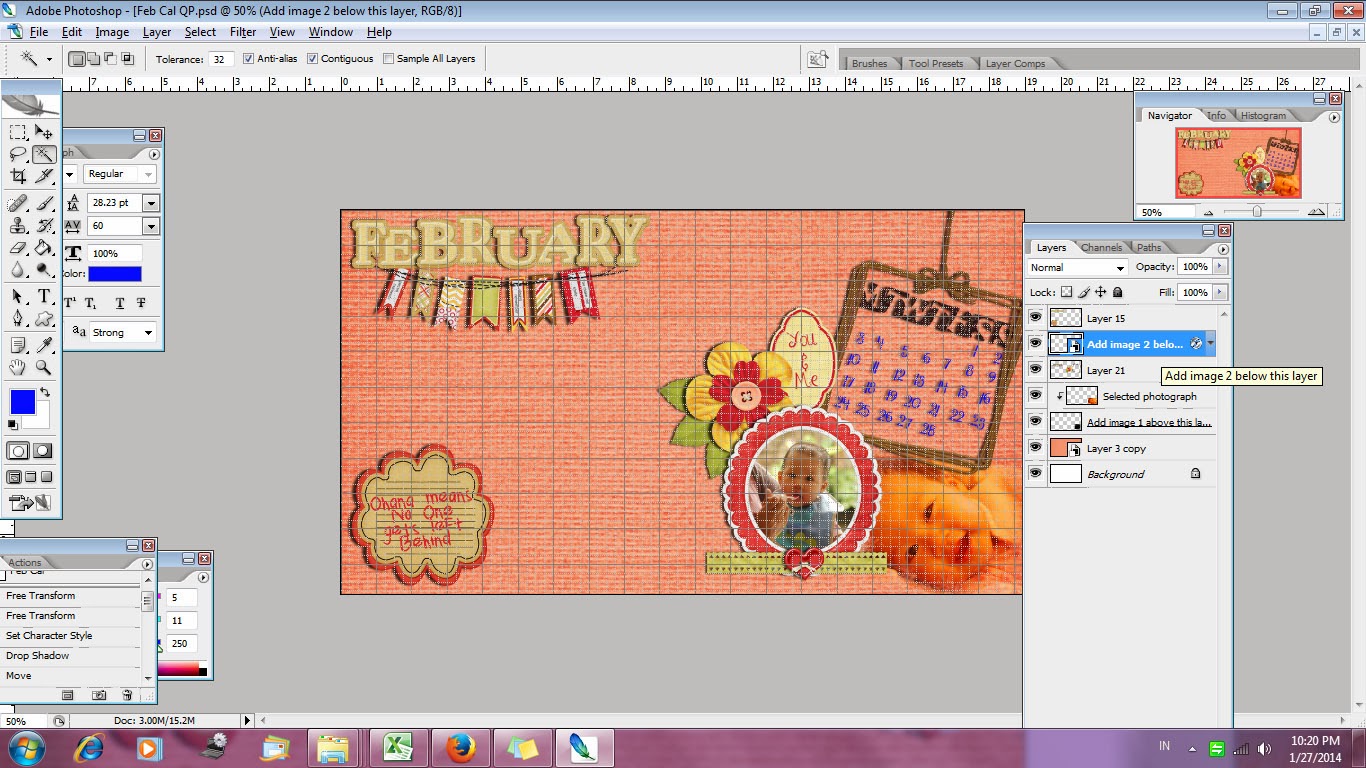
Tutorial on adding the photo.
1. To add the picture with photo mask
 -  If you open the quickpage psd file, you can see that I have 6 layers of image

  - Select your desired photograph, and place it above layer "Add image 1 above this ...."
 - Right click on you selected photograph layer and choose "create clipping mask"
 - Voila! Now all you need to do is nudge the picture a bit so it perfectly fits to the photo mask

2. To add the picture in Oval Frame
- Double click on layer "Add image 2 ...." , click OK on the popup message and you will be directed to a new workspace
- This new workspace contains a frame layer, and a photograph layer. 
- Add your favorite photograph to the workspace, put it below "Layer 7"
- Put all layers on hide except for Layer 7, choose the magic wand and select the area inside the oval frame
- Now activate the layer with your selected photograph, and unhide the layer. Click ctrl+shift+i , you can see now the selected area is shifted
- Click "delete", and you have cleared any excess photograph that doesn't fit the frame
- Save your work and exit the Layer 7 workspace, go back to your QP workspace, and the picture is changed already
 
 Now, you can totally enjoy your February calendar!
 

Fioritura Fiori Copyright © 2012 Design by Ipietoon Blogger Template